
Simple Markdown Reading in Chrome
Overview
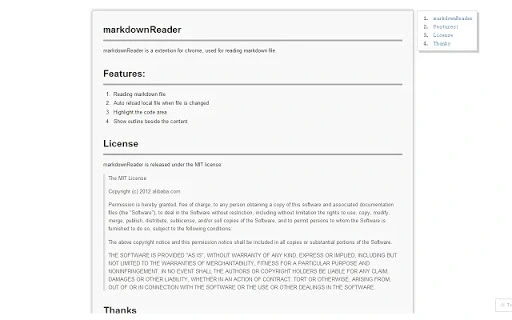
MarkdownReader is a Chrome extension designed to streamline the reading of Markdown files directly within the browser. It serves as a dedicated tool for developers, technical writers, and content creators who frequently work with Markdown documents. The software enables users to view and navigate Markdown files with enhanced readability and structure, offering features like code highlighting, outline display, and real-time file updates. It is particularly useful in workflows involving documentation, code repositories, and personal notes stored in .md format.
The extension operates entirely within the Chrome environment, requiring no external software or installation beyond the browser. Its primary purpose is to provide a clean, efficient reading experience without the need for full-fledged editors. The developer did not provide additional background details, but the extension is open-source and released under the MIT license, indicating transparency and community accessibility.
Real-world usage scenarios include reviewing documentation in GitHub repositories, checking project README files, or reading personal notes stored in Markdown format. The tool is ideal for users who prefer a lightweight, browser-based solution over desktop applications.
Key Features & Capabilities
- Markdown File Reading – Enables seamless viewing of .md files directly in Chrome, eliminating the need for external tools.
- Auto-Reload on File Change – Automatically updates the preview when the local Markdown file is modified, ensuring users always see the latest content.
- Code Block Highlighting – Applies syntax highlighting to code sections, improving readability for programming-related content.
- Outline Sidebar – Displays a navigable outline of headings, allowing quick navigation through long documents.
- Support for Extensions – Fully supports Tasklists, tables, and LaTeX rendering, enhancing the formatting capabilities of standard Markdown.
- Toggle Modes – Users can switch between raw Markdown mode and rendered preview mode by double-clicking, offering flexibility in viewing content.
These features collectively improve the user experience by reducing friction in reading technical documentation. For example, a developer reviewing a README file can instantly see the formatted content, jump to sections via the outline, and observe syntax-highlighted code blocks without switching contexts.
User Interface, Workflow & Performance
The user interface is minimal and focused on content readability. The extension integrates directly into the Chrome browser, presenting the Markdown file in a clean, distraction-free layout. Navigation is intuitive, with a sidebar displaying the document’s structure for easy access to different sections.
Workflow efficiency is enhanced by the auto-reload feature and the ability to toggle between raw and rendered views. Users can work directly with local files by dragging them into the extension, simplifying the process of reviewing documents without leaving the browser.
Performance observations are based on general software behavior patterns. The developer did not specify resource usage details. However, given its lightweight nature and small file size of 512 KB, it is expected to have low CPU and RAM impact during operation. Stability is likely maintained due to its straightforward functionality and browser-based execution.
Compatibility & System Requirements
MarkdownReader is compatible with Chrome browsers, as specified. It operates exclusively within the Chrome environment and does not support other browsers or operating systems.
Installation size is 512 KB, which is minimal and suitable for users with limited storage. The extension requires access to file URLs, which must be enabled in Chrome’s extensions settings.
Exact system requirements were not listed. Compatibility information is limited to Chrome support. No hardware specifications were provided.
Pros and Cons
Pros
- Lightweight and fast with minimal resource usage
- Direct file preview without external tools
- Auto-reload on file changes for real-time updates
- Supports advanced Markdown features like LaTeX and tables
- Open-source and free under the MIT license
Cons
- Exclusive to Chrome; no support for other browsers
- No built-in editing capabilities
- Requires manual enablement of file URL access
- Limited to local file viewing, no cloud integration
- No offline mode documentation provided
FAQ Section
Is MarkdownReader available for browsers other than Chrome?
Currently, the extension is only designed for Chrome. No official support exists for other browsers.
Is the extension safe to use with local files?
Yes, the extension reads local files only when explicitly loaded by the user. It does not transmit file contents to external servers.
How do I enable file URL access in Chrome?
Go to chrome://extensions/, enable Developer Mode, and check the “Allow access to file URLs” option.
Does the extension support editing Markdown files?
No, MarkdownReader is a viewer-only tool. It does not include editing features.
Is there a license for this software?
Yes, MarkdownReader is released under the MIT license, which allows free use, modification, and distribution.
Final Thoughts
MarkdownReader delivers a focused, efficient solution for users who need to read Markdown files directly in Chrome. Its clean interface, real-time updates, and support for advanced formatting make it a valuable tool for developers and technical writers. While it lacks editing capabilities and browser versatility, its lightweight design and open-source nature enhance trust and accessibility.
For anyone working regularly with Markdown documents and seeking a no-frills preview tool, this extension offers a reliable and secure experience. Its simplicity and integration with Chrome make it a strong choice for on-the-go reading.
Download MarkdownReader now







